

dump3411: A Local Remote ID Receiver for Drones
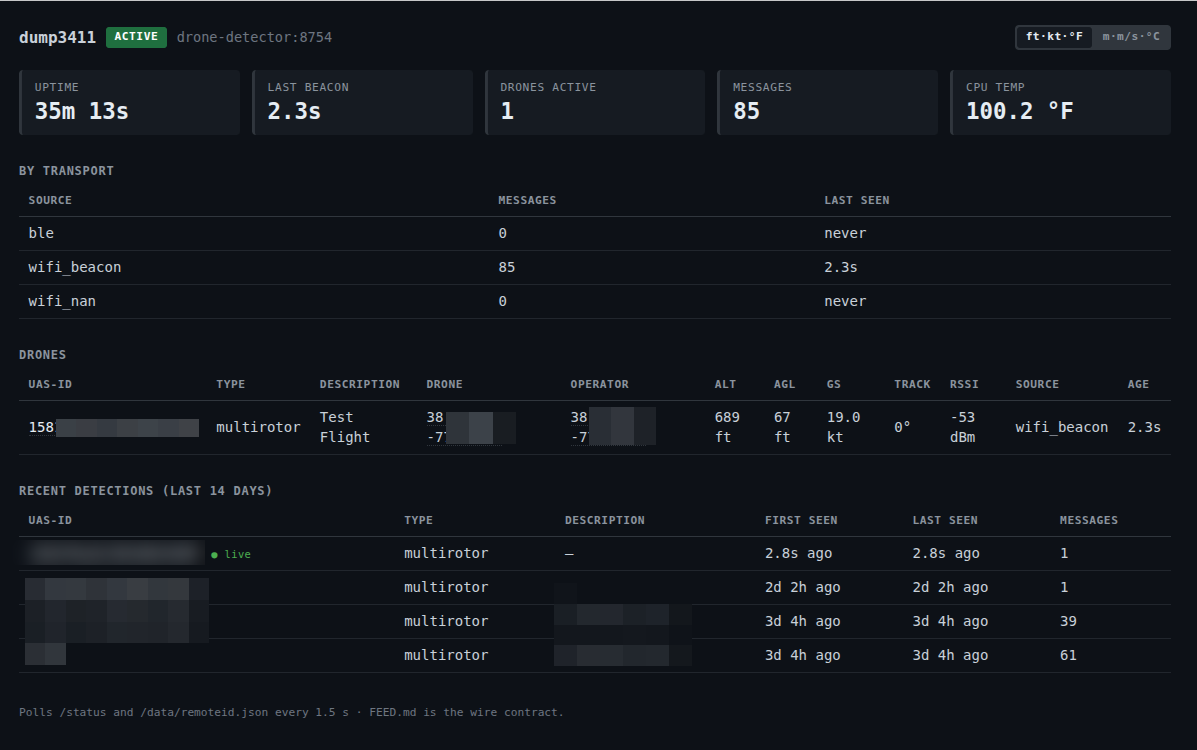
Open dashboard screenshot at full size
Contents
Project: dump3411 · Source · Installation · Documentation
I have been running local aircraft receivers for a while. dump1090 handles ADS-B on 1090 MHz, dump978 handles UAT on 978 MHz, and together they turn aircraft broadcasts around me into data I can actually use.
When I started looking at drone Remote ID, the obvious question was: where is the equivalent of dump1090 for drones?
That question eventually became dump3411.
The idea is fairly simple: listen for the Remote ID broadcasts that drones are already transmitting, decode them locally, and expose the result in a form that other software can use. No cloud account is required, nothing needs to leave the local network, and the receiver can run on inexpensive Linux hardware.
The name is a little different from dump1090 and dump978 because Remote ID is not tied to one RF frequency. It can be carried over Bluetooth and Wi-Fi. 3411 comes from ASTM F3411, the standard behind broadcast Remote ID.
Where it started
The first version was less ambitious than what exists today.
I wanted to know whether I could take a Raspberry Pi, add the radios needed to hear Remote ID, and get the same kind of local visibility I already had with ADS-B and UAT.
A Raspberry Pi Zero W was an especially interesting target because it is inexpensive, low power, and already more than capable of running a small headless receiver if the software stays lightweight enough.
For Wi-Fi reception I used an Alfa AWUS036NEH based on the Ralink RT3070 chipset because it supports monitor mode. Bluetooth can use the Pi’s built-in adapter or a USB adapter.
The first milestone was not a polished dashboard. It was simply getting valid ASTM F3411 messages off the air, decoding them correctly, and turning them into useful local data.
That part is still the core of the project.
What it receives
Remote ID can be broadcast over several transports, and dump3411 now handles all three defined broadcast paths:
- Bluetooth Low Energy, both legacy advertising and Bluetooth 5 extended advertising with message packs
- Wi-Fi Beacon
- Wi-Fi NAN
The messages can include things like the drone’s identifier, position, altitude, speed, heading, status, and operator or takeoff location when that information is present in the broadcast.
One important distinction is that this is broadcast data from the drone. dump3411 is not identifying a person behind the drone and it is not doing an FAA registration lookup behind the scenes.
The receiver decodes what is actually on the air.
Why local matters
There are commercial and cloud-based ways to work with drone tracking data, but that was never really what I wanted for this project.
I already had local receivers for conventional aircraft. I wanted drone detection to behave the same way: radios in, structured data out.
That makes it useful even if the dashboard is never opened.
The current receiver can write decoded messages to the system journal, expose a JSON feed over the LAN, publish detections over MQTT, and optionally maintain a small SQLite history database. There is also a built-in dashboard for seeing what the receiver is actually hearing and a map view when history is enabled.
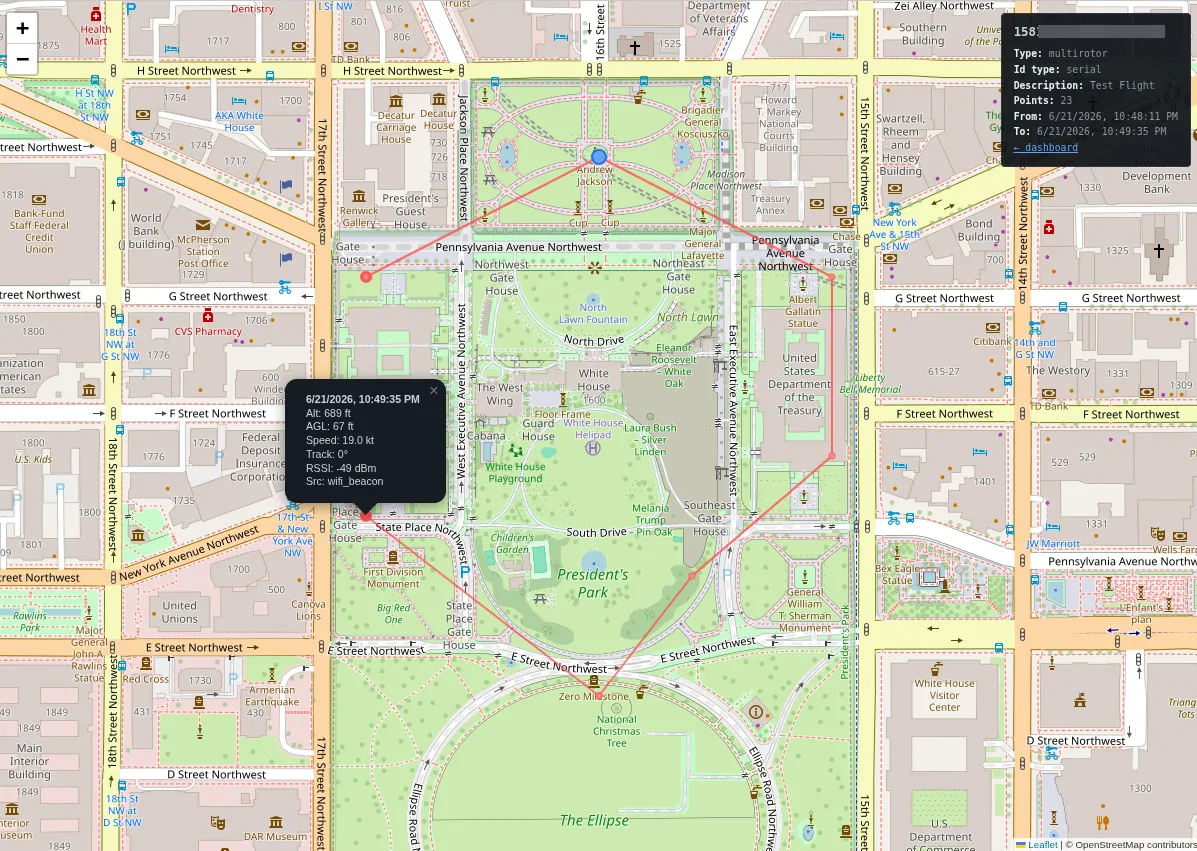
The map view, drawn from a synthetic test flight so it shows no real location.
But the feed is the important part. The UI is there because it is useful for humans and useful when debugging the receiver. The structured output is what allows the project to become part of something larger.
That led to ha-airspace
Once dump3411 was reliably producing Remote ID data, the next question was what to do with it.
That became ha-airspace, a service for Home Assistant that brings together the local airspace around the house.
ha-airspace can consume dump3411’s feed alongside aircraft data and expose it through Home Assistant, where it can be used in dashboards, automations, notifications, or whatever else makes sense for a particular installation.
That separation has worked well.
dump3411 is responsible for the radios, capture, decoding, and a clean feed. ha-airspace is a consumer of that feed and is responsible for presenting it in the context of Home Assistant.
Neither project has to know too much about the other.
If I change how I want to use the data later, dump3411 can stay a standalone receiver. If someone wants the receiver but has no interest in Home Assistant, they can use the JSON or MQTT output directly.
If you want to see the other side of that setup, I wrote a separate article about ha-airspace and local-first aircraft and drone awareness in Home Assistant. The ha-airspace project is also on GitHub.
The DJI path I did not pursue
There was another direction I spent some time looking at before deciding not to make it part of this project.
Before standardized Remote ID became the normal path, DJI had its own drone identification system. The commercial receiver was called AeroScope, and DJI aircraft transmitted a proprietary signal generally referred to as DroneID.
At one point I wanted to receive that too.
The attraction was obvious: it could potentially provide visibility into older DJI aircraft that do not transmit ASTM F3411 Remote ID.
I already use inexpensive RTL-SDR hardware for aircraft reception, so the initial thought was to add another SDR and decode the DJI broadcasts as another input.
There is published research showing that this is possible. Researchers reverse-engineered DJI DroneID and demonstrated receivers built around more capable software-defined radios such as HackRF.
The problem is that this stops looking like the rest of the project pretty quickly.
An inexpensive RTL-SDR does not have the frequency coverage and instantaneous bandwidth needed for the OcuSync-based approach. The known research implementations use substantially more capable SDR hardware and significantly heavier signal processing than the Bluetooth and Wi-Fi packet capture used for F3411.
There are also demonstrations using multiple HackRF units and desktop-class hardware that achieved useful range, so I do not think it is accurate to say DroneID itself is inherently short range. The issue was that the low-cost approach I wanted to build did not make sense.
By the time the receiver hardware, DSP work, and compute requirements were added up, I would have been building a considerably more expensive and complex system to support an older proprietary protocol from one manufacturer.
Meanwhile, ASTM F3411 was becoming the standard path for Remote ID.
So I parked it.
I would not call that decision permanent. If SDR hardware with the right capabilities becomes inexpensive enough, or a much lighter receiver implementation appears, it would be interesting to revisit. For now, keeping dump3411 focused on standardized Remote ID makes more sense.
What changed along the way
A lot of the useful work in this project has come from the details that only become obvious once hardware is actually running.
Bluetooth 5 message packs needed different handling from legacy Bluetooth advertising. Wi-Fi Beacon and NAN reception have their own quirks. We found cases where decoded fields looked plausible but were wrong because a flag or byte offset was being interpreted incorrectly.
Testing against known-good OpenDroneID encoders and real transmitters has been important because a decoder can be wrong in ways that still produce believable numbers.
The project has also benefited from outside contributions, including interoperability work against ESP32-based Remote ID transmitters. That is exactly the sort of contribution I would like to see more of.
Different Bluetooth adapters, Wi-Fi chipsets, Linux distributions, drones, Remote ID modules, and RF environments all expose different edge cases.
Running it
The current implementation runs on Linux with Python 3.10 or newer.
It has been tested on Raspberry Pi OS, including a Raspberry Pi Zero W with an RT3070-based Wi-Fi adapter. More powerful Raspberry Pis and normal Linux systems are also fine.
A receiver needs:
- a Bluetooth adapter
- a Wi-Fi adapter that supports monitor mode
- Linux
The project includes an installer and a systemd service, so getting from a fresh checkout to a running receiver is intentionally pretty small.
I am not duplicating the installation instructions here because those will change faster than this article should. The current setup instructions are maintained in the dump3411 repository.
Where this is going
The Pi version is not the end of the idea.
The next thing I am working on is an ESP32-based receiver. It is related to dump3411, but I do not necessarily expect it to be a straight port of the Linux project.
Part of the goal is to make Remote ID reception smaller, cheaper, and easier to deploy without needing a Linux host.
I am also working with the creator of SkySpy on an enhanced standalone version that adds a small e-ink display and physical controls. The idea is a self-contained receiver that is easy to acquire, inexpensive to build, and useful without another computer sitting next to it.
That solves a different problem from the Pi receiver.
The Raspberry Pi version makes sense as infrastructure: put it somewhere, leave it running, and feed the data into other systems. An ESP32 version can become something much more portable.
There is room for both.
Contributing
If you just want local drone detection, dump3411 should already be useful as-is.
If the lower-level side is more interesting, there is plenty of room to help.
Useful contributions include testing additional Bluetooth and Wi-Fi hardware, capturing behavior from different Remote ID transmitters, improving decoder test coverage, checking interoperability against the ASTM/OpenDroneID ecosystem, improving installation across Linux distributions, or simply finding the assumptions that only worked on my hardware.
This is one of those projects where more hardware diversity is genuinely useful.
The code is MIT licensed and development is on GitHub.
Next steps
If you want to try it, start with the current setup instructions in the dump3411 repository.
If you are already using Home Assistant and want to combine Remote ID with the rest of your local airspace data, read the ha-airspace article or go directly to the ha-airspace GitHub repository.