

ha-airspace: Local-First Aircraft and Drone Awareness in Home Assistant
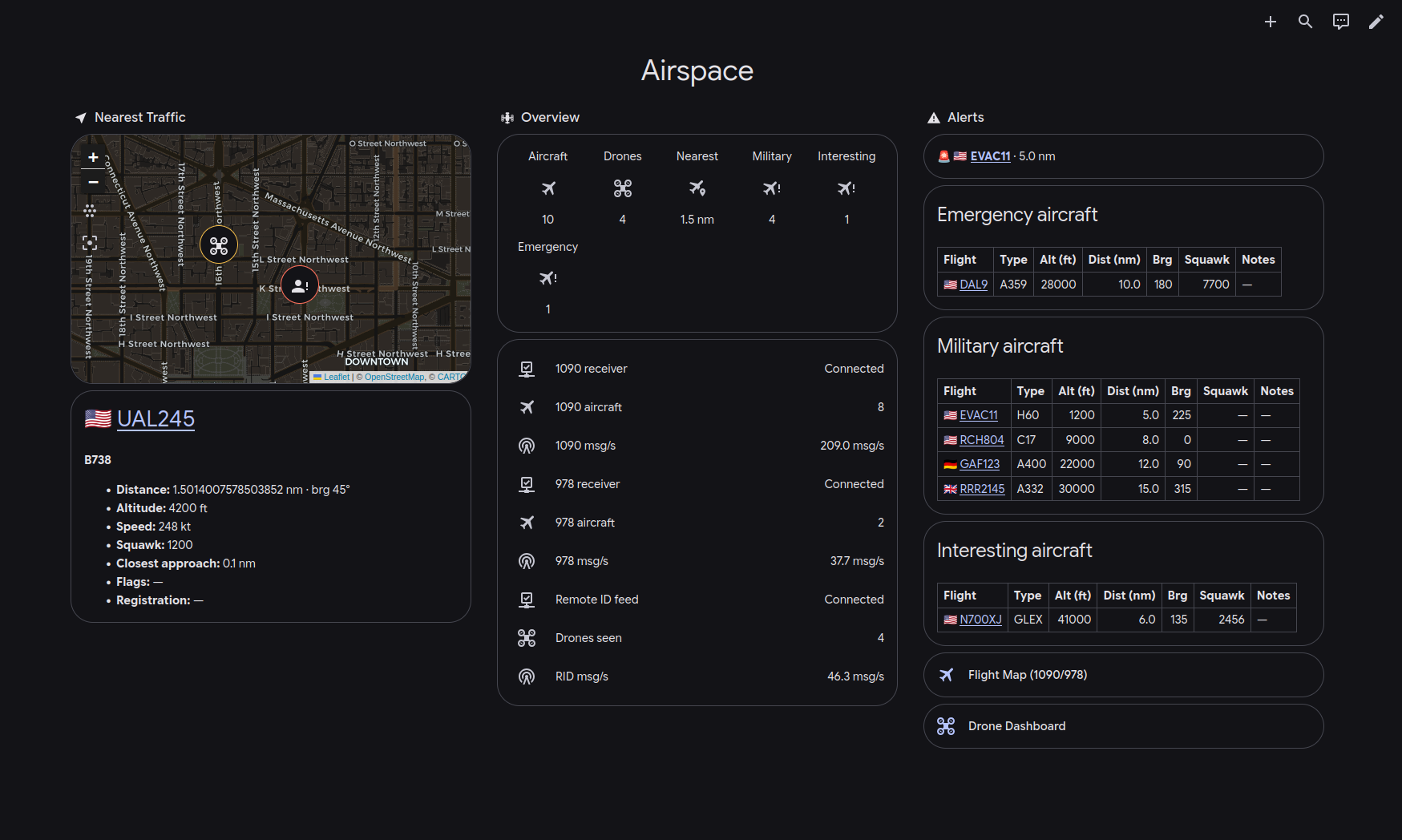
Open dashboard screenshot at full size
Contents
Project: ha-airspace · Source · Installation · Documentation
Most of what a home ADS-B receiver hears isn’t worth a second look: airliners at cruise altitude on their way somewhere else. Now and then it’s something worth knowing about: a military helicopter circling the neighborhood, an aircraft a few miles out squawking 7700, or a drone hovering over the street. The receiver hears those too, but nothing marks them. Each one is another row in a long list of hex codes, and unless you’re watching the map at that moment, you never find out it was there.
I wanted my house to tell me when that happened. I didn’t want a map I’d have to remember to check. I wanted a push notification with a photo of the aircraft, how far away it is, and whether its course will bring it overhead in the next few minutes. I wanted that from the receivers I already run, not from someone else’s cloud API. Most drones are now required to broadcast their position and where they’re being flown from, so I wanted drones in the same picture.
Nothing I could find did all of that. The most popular Home Assistant flight integration, home-assistant-flightradar24, pulls from FlightRadar24’s API, so the receiver on your own network goes unused. The closest match, adsb-aircraft-tracker, does read your own receiver and alerts on military aircraft and emergency squawks, but each receiver stays separate and it doesn’t know about drones. Building it from Home Assistant REST sensors and Jinja templates works for a sensor or two and falls apart after that.
So I built ha-airspace. It reads ADS-B (1090 MHz), UAT (978 MHz), and drone Remote ID from my own receivers. It merges them into one view of the airspace, flags the traffic worth attention, and publishes the result to Home Assistant over MQTT. Core tracking uses my own receivers; internet-based enrichment is optional. The dashboard at the top of this post is the example that ships with it, rendered from a synthetic scene around the White House so it shows no real location.
Get started: Install and configure ha-airspace as a Home Assistant add-on or Docker container.
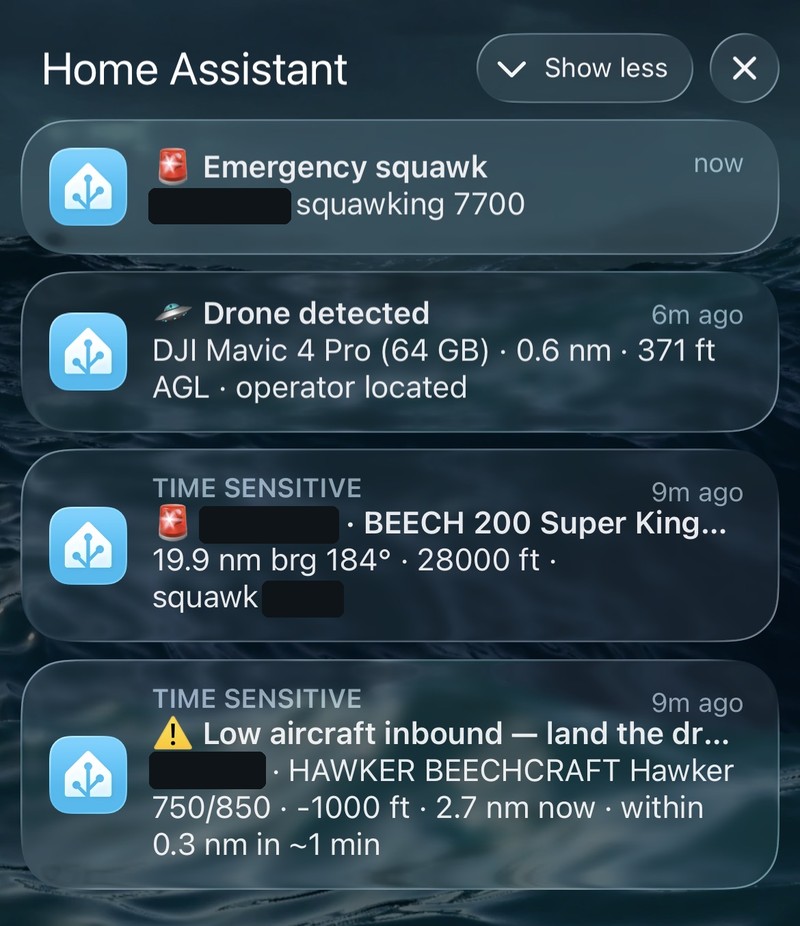
Real alerts from about ten minutes on my phone; the drone is my own Remote ID test transmitter. I blacked out the callsigns and one squawk code: matched against public flight tracks, the distances and bearings would show where I live.
The problem with templates
A PiAware or readsb receiver serves a file called aircraft.json: every aircraft it can hear right now, refreshed about once a second for the receiver’s own map page. The usual way to get it into Home Assistant is a REST sensor plus Jinja templates: one for the nearest aircraft, another to pick out military callsigns, another for emergency squawks. Here’s where that approach runs out:
- No joins. The receiver reports an aircraft’s ICAO hex code, while reference data can add registration, aircraft type, and database-backed military or privacy flags. Templates are not a practical place to join against a 620,000-row table.
- No state. “Has this tail number been seen in the last 30 days?” or “Has this helicopter been circling for two minutes?” need memory across polls, which templates don’t have.
- One receiver at a time. If you run a 1090 and a 978 receiver, or receivers at two sites, the same aircraft shows up twice and nothing reconciles the two.
- Everyone rebuilds the same thing. Every receiver owner ends up writing the same templates.
Architecture: a service, not an integration
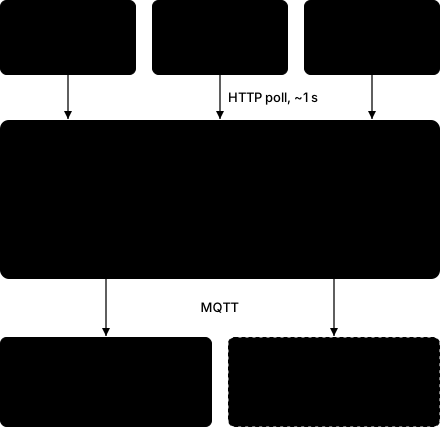
I made three decisions early, and most of what came later rests on them.
The only input is HTTP. Every dump1090 variant serves aircraft.json over HTTP, including locked-down FlightAware appliances where you can’t install anything. ha-airspace never touches a receiver’s filesystem and never changes its config. You list each receiver by its aircraft.json URL and its band (1090 or 978), and ha-airspace reads the receiver.json beside it for the station’s coordinates. A receiver at another site works the same way over Tailscale.
It runs as its own service, outside Home Assistant. It keeps reference databases in memory, polls with backoff, tracks state for each aircraft, and writes to a SQLite journal. That’s a full Python application, and running it as a Home Assistant custom integration would tie all of that to HA’s event loop and release cycle. As a separate process it serves Grafana or Node-RED just as well as HA.
Its only output is MQTT. Aircraft appear, update every second, and disappear, and MQTT handles that kind of data well. Home Assistant’s MQTT discovery creates the entities, so I didn’t have to write an integration. State topics are retained, so a consumer that starts late sees the current airspace immediately. When an aircraft drops out of range, ha-airspace clears its retained topic, so a consumer that connects later doesn’t see aircraft that have already left.
One rule held for the whole project: no entity per aircraft. If every passing aircraft became an entity, HA’s registry would fill up within a day. Per-aircraft data goes to airspace/aircraft/<hex> for anyone who wants to subscribe to it. Home Assistant gets a small fixed set of entities: nearest aircraft, counts, one sensor per flag, one binary sensor per alert rule, and receiver health.
Merging receivers
The merger is the most interesting part of the service. Several receivers poll independently and can report the same aircraft in the same cycle, sometimes with different positions. The merger has to choose one.
Picking the strongest signal sounds right, but it’s a poor choice. A nearby receiver catching a multipath reflection can have higher RSSI and a worse position than a distant receiver with clear line of sight. ADS-B aircraft report how good their own positions are, so the merger ranks observations by that:
- Fresh position (
seen_posunder 5 s) - Higher NIC (Navigation Integrity Category, broadcast by the aircraft)
- Higher NACp (Navigation Accuracy Category for position)
- Fresher position
- Higher RSSI, used only as a fallback
- Receiver name, so ties always resolve the same way
The same hex seen on 1090 and 978 is the same aircraft, so it merges into one track tagged with both bands. Each receiver fails fast: one HTTP request per poll and no hidden retries. A receiver that fails three times in a row is marked unhealthy, and the others carry on. One flaky receiver never takes the service down.
Flags and alerts as config
The rest of the pipeline is mostly declarative. A flag labels a track, and each flag has exactly one matcher:
enrichment:
  flags:
    military:
      sources: ["mictronics:mil", "adsbexchange:mil"]
    emergency_squawk:
      squawks: ["7500", "7600", "7700"]
    rotorcraft:
      categories: ["A7"]
An alert combines flags with geometry. One rule covers how they combine: different keys are ANDed, and items in a list under one key are ORed. I settled on that before v1 because changing it later would silently change what everyone’s existing rules match.
  alerts:
    rules:
      - name: military_close
        match:
          flags: ["military"]
          max_distance_nm: 30
          watchpoint: home
      - name: inbound_low
        match:
          max_closest_approach_nm: 5   # projected to pass within 5 nm
          within_eta_s: 600            # ...in the next 10 minutes
          max_alt_agl_ft: 10000        # ...and low
Alerts fire on ENTER and EXIT transitions, not on every poll. Each rule has a cooldown so a flag that flickers doesn’t send a stream of notifications. Some flags are computed rather than configured:
orbitingsums the signed change in heading over a sliding window. Straight flight sums to about zero, and a sustained turn builds toward 360°. Because the sum is signed, S-turns cancel out, while a racetrack holding pattern still adds about 360° per circuit. It catches circling police helicopters, holding patterns, and loitering drones.- Predictive inbound projects each track onto a flat local plane and solves for the closest point of approach to home,
t = −(r·v)/(v·v). A departing track never matches, however close it is. - History-aware rules such as
unseen_for_days: 30read the SQLite journal, so “a tail number I haven’t seen in a month” survives restarts.
Reference data comes from two databases, Mictronics (via tar1090-db) and ADSBexchange, merged field by field. ADSBexchange takes priority on the military flag because it’s updated more often. When enabled, Planespotters photo URLs and attribution are attached to alerts, and as of 1.1.8, BE20 shows up as “BEECH 200 Super King Air” in notifications.
Drones as a third band
Most Home Assistant airspace projects stop at manned aircraft. Remote ID has been mandatory for most US drones since 2024: each one broadcasts its serial number, position, and altitude over Bluetooth and Wi-Fi, plus a location for the person flying it. A drone with Remote ID built in sends the controller’s live position. An add-on broadcast module has no way to know where the controller is, so it sends the takeoff point instead, and some transmitters switch between the two from one message to the next. My companion project dump3411 decodes those broadcasts (ASTM F3411) on a Linux box, including which kind of location each message carries, and serves them as JSON.
I designed the two projects to share no code, only a documented feed contract (FEED.md). It copies the conventions of dump1090’s feed (a now timestamp, seen ages, about one poll per second) so the existing receiver plumbing reads it unchanged. The object schema itself is designed around Remote ID. A drone isn’t a manned aircraft, and a literal aircraft.json clone would have to put a string serial in the ICAO hex field, which breaks the database lookups and leaves no field for the operator’s location.
Inside ha-airspace, a drone is just a track with band: "remoteid", keyed by its UAS ID. It goes through the same merger, distance math, and alert engine as aircraft. It skips the ICAO databases. Optional FAA UAS Declaration of Compliance lookups add make and model from broadcast serial numbers. Those internet lookups use an in-memory TTL cache; drone tracking and broadcast locations do not depend on them. Drones also get their own entities, including the operator’s location, which ADS-B has no equivalent for. The location type comes along with it, so a takeoff point is labeled as one instead of being passed off as the operator.
Spoof detection
Remote ID has no cryptographic authentication. I tested this with replay traffic I generated myself: a spoofer can rebroadcast real serials it heard earlier, and those serials look up cleanly in the FAA registry. Checking identity can’t catch a replay, so the spoof_suspect flag looks for inconsistencies in behavior instead:
- A message claims
id_type: serialbut the value can’t be a valid ANSI/CTA-2063-A serial (for example the placeholder0x00). - Several distinct serials in the air at once share the same free-text Self-ID. Independent pilots almost never type the same string. A replay tool stamps one string on every fake serial it sends; in my test that string was “Spoofing test” across three serials.
The kinematic checks come next: position jumps no drone could fly, or the same serial in two places at once. Those need the durable sighting store, which isn’t built yet.
What a summer on a Raspberry Pi found
v1.0 shipped on June 23 after about seven weeks: phased delivery, strict mypy, and a test suite that now has more than 830 tests, including integration tests against a real Mosquitto container. Releases 1.1.x came from running it in the field. Each of these bugs looked like normal behavior, which is why they lasted.
An OOM kill that left no log entries
The Home Assistant add-on would start, load the databases, and a few seconds later the log would begin again from the top. It logged no shutdown line, no traceback, and no error. The explanation was in the kernel log:
kernel: Out of memory: Killed process 122326 (ha-airspace) anon-rss:608804kB
supervisor.apps.app: App Airspace exited with non-zero exit code 137
The database loader briefly held three copies of the 620k-row merged table: it parsed one source into a dict, copied it into a merged dict, then parsed the second source while both were still in memory. Two details hid this. The Supervisor sets an add-on’s memory limit to the machine’s total RAM, so the container limit never triggers; the kernel runs a global OOM kill instead and picks the largest process. And a SIGKILL skips every exit path, so an OOM leaves the same evidence as a segfault, which is none.
The fix parses every source in priority order directly into one dict and interns repeated strings. Peak memory dropped from about 610 MB to about 240 MB. I also turned on faulthandler. It can’t catch a SIGKILL, and that turns out to be useful: if a restart leaves no stack dump, the process was killed from outside, and the host log is the place to look.
The same investigation found a receiver configured with a dead URL. It had logged 22,159 identical warnings in 18 hours, each one a journald write to an SD card. Failure logging now backs off exponentially and reports receiver_recovered when the receiver comes back.
Drone rules that could never match
Every documented drone rule had a max_alt_agl_ft limit, and that check read barometric altitude. Remote ID transmitters don’t have barometers, so alt_baro_ft was always null for drones. The check failed every time, and every drone rule could only trip on manned aircraft. A rule that can never match looks exactly like a quiet sky. The fix reads the drone’s broadcast height above takeoff, which is a more direct AGL measurement than anything available for aircraft.
Fixing that exposed the next bug. Once drone rules could match drones, drone_nearby, built only from distance and altitude, also matched a light twin at about 1,500 ft and announced it as a drone. Every Remote ID track now gets a derived drone flag that rules can require. It belongs on drone_nearby, which watches someone else’s drone. It doesn’t belong on drone_conflict, which watches for low manned traffic heading toward the area where my drone is flying so I can land. The two names look alike, but they watch different subjects.
Alerts that replayed after a restart
Retained MQTT topics outlive the process that published them. If an alert was on when the service stopped, its topic stayed on. On reconnect the service published online before running any evaluation, so Home Assistant saw the alert go from unavailable to on and sent a notification about a detection that hadn’t happened. Now, on every connect, the service publishes the real current state of every rule while still marked offline, and only then sets itself available. It publishes the real state rather than clearing everything: after a mid-run broker reconnect some rules really are active, and clearing them would flip them off and back on, which sends the same duplicate notification another way.
Using it
Local operation and optional internet enrichment
ha-airspace reads your receivers and publishes to MQTT on your own network. Receiver polling, track merging, distance and bearing calculations, and alerts based on locally available data do not require internet access. Your receivers, MQTT broker, Home Assistant, and local network still need to be running and reachable.
Internet access is used only for optional enrichment:
- Mictronics and ADSBexchange: Download aircraft reference data for registrations, aircraft types and model names, and database-backed flags such as military or privacy status. Enabled sources refresh in the background; the default interval is one week.
- Planespotters: Look up aircraft photo URLs and attribution. The images themselves are hosted externally, so a cached URL does not make a photo available offline.
- FAA UAS Declaration of Compliance registry: Look up drone make and model from broadcast serial numbers. Drone position and any broadcast operator or takeoff location come from Remote ID, not this registry.
If the internet goes down while the service stays running, local tracking continues. Previously loaded aircraft reference data remains available when all refresh downloads fail, but it cannot receive fresh updates. New photo and drone-registry lookups may be unavailable; alerts can still be published without those additions.
There is one restart limitation: aircraft reference databases and the photo and drone-registry lookup caches are currently held in memory. An offline restart does not restore those enrichments from disk. Core tracking still runs, but rules that depend on database-only information cannot match until the required data is loaded again.
You can omit or disable the aircraft database sources and leave photos and the drone registry disabled for operation without these external services. Installation and software updates require separate access to their download sources.
What you need
- Home Assistant with an MQTT broker. I use the Mosquitto add-on.
- A receiver that serves
aircraft.jsonfor each band you want: PiAware (dump1090-fa), readsb, or tar1090 for 1090 MHz ADS-B, and dump978 for 978 MHz UAT, which is only used in the US. - dump3411 on a Linux machine, if you want drones.
- A 64-bit machine for ha-airspace (arm64 or amd64). Peak memory with both reference databases loaded is about 240 MB, so a 2 GB Raspberry Pi is enough.
My hardware
Affiliate links: Links to Amazon are affiliate links. As an Amazon Associate I earn from qualifying purchases, at no extra cost to you.
- Raspberry Pi 4, Pi 5, or similar. I run dump1090 and dump978 on a Pi 4 and dump3411 on a dedicated Pi Zero W, but it should be possible to run all of it on one Pi 5.
For 1090 MHz ADS-B and 978 MHz UAT:
- Nooelec SAWbird ADS-B, a dual-channel filter and amplifier for 1090 and 978 MHz
- NooElec NESDR SMArTee XTR RTL-SDR dongles, two: one for each band
- 1090/978 MHz antennas, two: one for each band
For drone Remote ID:
- Bluetooth adapter for Remote ID over BLE. I’m still on the Pi Zero W’s built-in Bluetooth, which is version 4.1 and can’t hear Remote ID sent over Bluetooth 5 long range. I’ve ordered a TP-Link UB500 Plus, a Bluetooth 5.3 adapter with an external antenna, but haven’t tested it yet.
- Wi-Fi adapter that supports monitor mode, for Remote ID Wi-Fi beacons. I use an older Alfa AWUS036NEH, which isn’t available on Amazon anymore. The Alfa AWUS036NHA should be a drop-in replacement: like the NEH it’s 2.4 GHz only, which is all dump3411 listens on, and its driver is built into the Linux kernel. If it’s out of stock, look for an adapter with the same Atheros AR9271 chipset, or the NEH’s Ralink RT3070; both have monitor-mode drivers in the Linux kernel. Skip the AWUS036ACS on a Pi; its driver has to be compiled from source.
Installing
ha-airspace runs as a Home Assistant add-on (toggles turn on databases, photos, and the drone registry) or as a multi-arch Docker image on GHCR. The repo includes the example dashboard from the top of this post and an automation blueprint: import it once, then add one instance per alert rule from the UI. The MQTT payloads carry a schema_version, and the topic tree, entities, and config schema are a stable public interface, so consumers can depend on them.
- Home Assistant OS: Add-on installation and configuration.
- Docker: Run the Docker image.
- Dashboard: Example dashboard YAML.
The repo is github.com/ifnull/ha-airspace, MIT licensed. DESIGN.md covers the full rationale and roadmap.
What’s next
- Durable drone sightings: one enriched summary row per sighting, linking to dump3411’s own map for the full track. That’s what the Tier 2 spoof checks need.
- True AGL for aircraft from a digital elevation model, instead of subtracting the watchpoint’s elevation from MSL altitude.
- A custom radar card for the Home Assistant dashboard.
- Persistent aircraft reference caching: Save the last valid aircraft reference databases locally and restore them after a restart, so database-backed identification and flags remain available during an internet outage. This is planned; current reference data is held in memory and does not survive an offline restart.
- Offline FAA enrichment, if users need it: I’m open to adding a local backup of FAA make/model reference data so previously downloaded information can be used during internet outages. Keeping that copy current would require regular internet access to refresh it from the FAA. A one-time snapshot at installation could continue to resolve entries it already contains, but would become stale and miss new or changed entries. This is a possible future enhancement based on user demand, not a feature available today; core drone tracking already works without FAA enrichment.
Wrapping up
I built ha-airspace because the interesting traffic over my house kept going by unnoticed, even though my receivers heard all of it. Now it reaches my phone, like the alerts near the top of this post.
Every bug from the summer of running it looked like normal behavior. A rule that could never match looked like an empty sky, a kernel OOM kill looked like an ordinary restart, and a stale retained message looked like a fresh alert. None of them raised an error. If you build something like this, expect your failures to look like normal operation, and give them a way to announce themselves: a log line, a health entity, a stack dump.
The next post in this series covers dump3411, the receiver that produces the drone feed.
Next steps
If you already run a receiver and Home Assistant, start with installation and setup. The project’s repository maintains the Home Assistant add-on instructions and Docker instructions. If something looks off, open an issue with the relevant details.
Credits
ha-airspace only works because of other people’s projects and data:
- dump1090 and dump978 from FlightAware, and wiedehopf’s readsb and tar1090, which do the decoding and serve
aircraft.json. - Mictronics’ aircraft database, packaged in wiedehopf’s tar1090-db, and the ADSBexchange aircraft database, for registrations, types, and the military and privacy flags.
- Planespotters.net and its photographers, for the aircraft photos.
- The FAA’s UAS Declaration of Compliance registry, for drone make and model.
- richmobile, whose PR #56 was the first fix from someone other than me.
Revisions
- October 6, 2026 — Linked the dump3411 article.
- October 4, 2026 — Added installation links, clarified local operation and optional internet enrichment, documented planned persistent aircraft reference caching and a possible offline FAA enrichment enhancement, and made dashboard and notification screenshots available at full size. Added practical next steps for readers.